
Photo to URL Converter
Drop, paste, or drag an image and get a direct, permanent link in seconds — no account, no watermark, no expiry timer.
- Two clicks, start to link
- Direct file URLs
- No account needed
- Ctrl/Cmd+V a screenshot
or drop a file here
PNG, JPG, WEBP, or GIF up to 5 MB. 10 free uploads per day per IP — no account, no email.
Nothing to hand? Convert one of these:




The whole service in six numbers
No fine print further down the page — these are the actual limits.
- 5 MB
- Largest image per upload (PNG, JPG, WEBP, GIF)
- 10 MB
- Largest document on File to URL and PDF to URL
- 10 / day
- Free uploads per IP address, reset at midnight UTC
- Seconds
- Typical time from dropped file to copyable link
- 1 year
- Immutable CDN and browser cache on every hosted file
- 0
- Accounts, watermarks, and expiry timers
How the photo to URL converter works
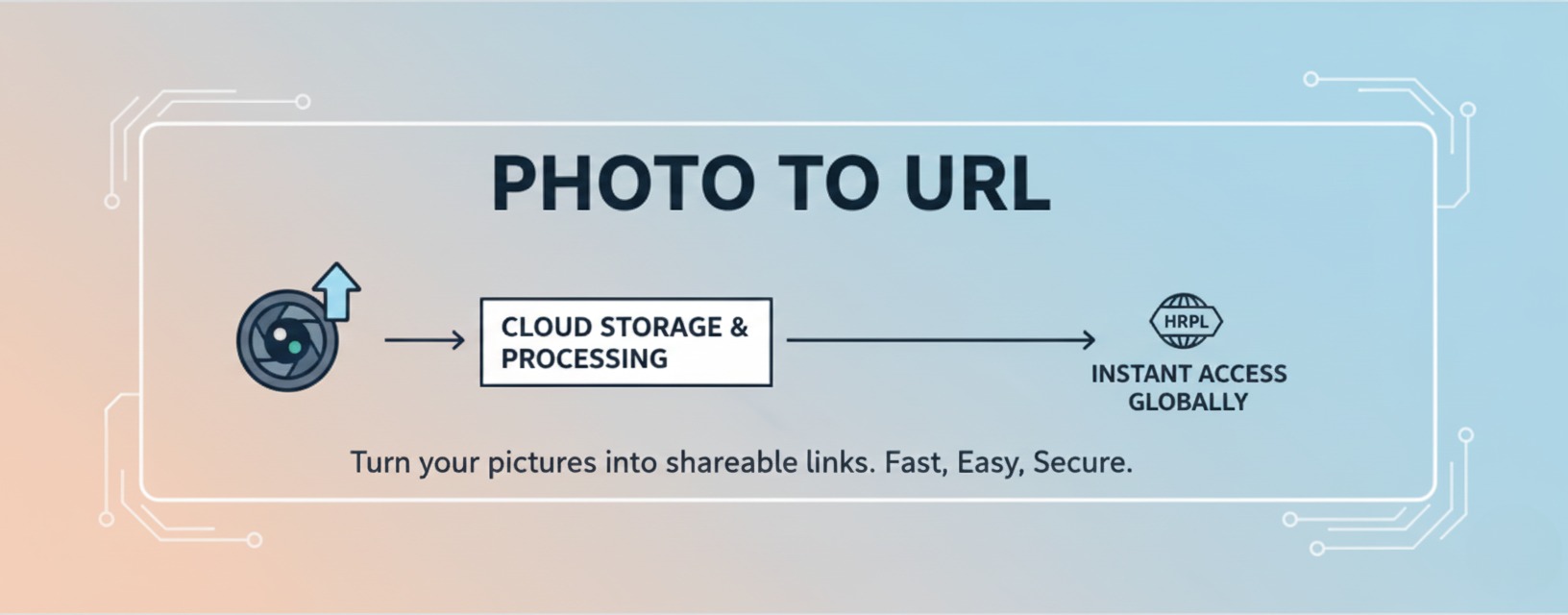
- 1) Add the image. Drag a file onto the uploader, press Ctrl/Cmd+V to paste a screenshot straight from the clipboard, or click to open your camera roll on a phone.
- 2) We store it and hand back the address. The file is written to storage server under a random, date-prefixed name such as 2026-05-14-9f3a2c7b.png, and the URL appears in the result card.
- 3) Copy it and get on with your day. One button copies the link, one opens it in a new tab so you can check it renders, and .txt saves it as a plain-text file for your notes.
Nothing is queued, emailed, or held for review: the link exists by the time the spinner stops, and it keeps working long after you close the tab.
From screenshot to shareable link in three steps
The same three moves whether you're on a laptop, a tablet, or a phone.
Drop, paste, or pick
Drag a PNG or JPG onto the card, hit Ctrl/Cmd+V for the screenshot you just took, or tap to browse the photos on your device.
Get a direct URL
The link points at the image file itself and ends in .png, .jpg, .webp, or .gif — not a viewer page you have to convert first.
Paste it anywhere
Markdown, an HTML img tag, a Jira ticket, a Notion page, a forum post, a CMS field — anywhere a URL is accepted.
What you get with every image link
Small details that decide whether a link is actually usable where you're pasting it.
Direct file links, not viewer pages
Every URL points at the image itself and keeps its real extension, so HTML img tags, Markdown embeds, CSS backgrounds, and Open Graph previews all resolve on the first try. A cloud-drive share link hands you an HTML page instead, which none of those four can read.
Clipboard to link, no Save As dialog
Take a screenshot, click the uploader, press Ctrl/Cmd+V, and the file never touches your Downloads folder. It's the shortest path there is from a bug you just spotted to a link inside the ticket.
Copy, open, or export as .txt
One click copies the URL to your clipboard, one opens it in a new tab so you can confirm it renders, and .txt downloads the link as a plain-text file you can drop into a runbook or a hand-off doc.
Storage server, cached for a year
Uploads are written to storage and served with a one-year immutable cache header, so repeat views come from a CDN edge near the reader instead of round-tripping to the origin every time.
Random, unguessable file names
Your original filename never travels with the upload: files are renamed to a UTC date plus a UUID, and hosted files are kept out of search indexes. Anyone holding the link can still open it, so treat the link exactly like the file.
No account, no watermark, no countdown
There's no sign-up wall, no email confirmation, no logo burned into a corner of your image, and no 7-day or 30-day timer ticking on your link. The only limit is 10 uploads per IP per day.
Recent links stay in your browser
The links you generate are kept in this browser's local storage and listed in the Upload records drawer, so yesterday's screenshot is one click away instead of a re-upload. Clearing site data clears the list.
Edit before you host, in the same tab
Circle Crop, Rounded Corners, and Remove Background run locally on this site, so you can round an avatar, soften an icon, or knock out a product background and only then generate the link.
Where a direct image link saves the most time
The situations people actually open this page for.
Bug reports and support threads
Paste the screenshot, drop the link into Jira, Linear, Zendesk, or the customer's chat, and every reader sees the same image without a 4 MB attachment landing in their inbox. One link keeps a thread readable where five inline files wouldn't.
READMEs, docs, and changelogs
GitHub and most static-site generators only render an image from a real URL. Paste the link into  and your diagram or UI shot appears without committing a binary to the repository.
Email signatures and templates
Signatures and campaign templates reference images by URL rather than embedding them. Host the logo once and point every template at the same address, so a rebrand is one upload instead of fifty re-attachments.
Listings and forms that ask for an image URL
Plenty of marketplace templates, forum classifieds, and CMS fields accept an address but not a file. Run the product shot through Remove Background first and paste the transparent PNG's link straight into the field.
Prototypes, slides, and design hand-offs
Figma, Framer, Notion, and most no-code builders take a URL in an image field. Hosting the asset means your teammates load the current version instead of hitting a broken local file path.
Forums, wikis, and community posts
BBCode boards and wiki editors want [img] tags or an external address. Because links here aren't on an expiry timer, a how-to post you wrote two years ago still shows its screenshots today.
Why people keep this tab open
Three differences you notice within the first upload.
Nothing between the file and the link
No account to create, no confirmation email, no album to choose, no upload queue. Drop the file, copy the link — that's the entire interaction.
Links that don't rot
Uploads aren't auto-deleted after 7, 30, or 90 days, and URLs aren't rotated behind your back. A link you paste into documentation today is meant to still resolve when someone reads that page next year.
Editing and hosting in one place
Most hosts stop at storage. Here you can crop a round avatar, add a corner radius, or cut out a background locally first — then host the finished file without ever leaving the site.
Paste-ready snippets for the link you just made
Swap in your own URL; everything else stays exactly as written.
Example link: https://cdn.phototourl.org/2026-05-14-9f3a2c7b.png
Markdown
HTML
<img src="https://cdn.phototourl.org/2026-05-14-9f3a2c7b.png" alt="Dashboard screenshot" width="800">BBCode
[img]https://cdn.phototourl.org/2026-05-14-9f3a2c7b.png[/img]CSS
background-image: url("https://cdn.phototourl.org/2026-05-14-9f3a2c7b.png");Keep a real description in the alt text — it's what screen readers announce and what image search reads. "image" or an empty alt tells neither anything.
A direct link vs. the usual workarounds
Why an attachment, a drive share, or a chat upload often isn't enough.
| How you shared it | What the recipient gets | The catch |
|---|---|---|
| Email attachment | A copy of the file | No URL at all, size caps bounce large files, and nobody can embed it in a page or a ticket. |
| Cloud-drive share link | A viewer page | The URL opens a preview interface, so img tags and Markdown embeds show nothing until the link is converted by hand. |
| Chat app upload | A platform-hosted file | Some platforms sign attachment URLs and expire them, so a link pasted into docs can quietly stop resolving. |
| Photo To URL | A direct file URL | Ends in the real extension, renders in any img tag, and is not on an expiry timer. |
Three workflows worth setting up once
Small routines that make the hosting step disappear entirely.
Screenshot → ticket, without the Save As dialog
Capture with your keyboard shortcut, click the uploader, press Ctrl/Cmd+V, copy, and paste the link into the ticket. No file ever lands in Downloads, and the reviewer sees the image inline.
Headshot → circle crop → one avatar link
Run the photo through Circle Crop, download the round PNG, drop it back on the uploader, and reuse that single URL across every profile, bio, and team page instead of re-uploading per site.
Product photo → transparent cutout → listing
Remove Background does the cutout in your browser, the uploader turns the transparent PNG into a link, and the listing or slide deck that asks for an image address gets it in one paste.
Rate Photo To URL Converter
A practical guide to turning photos into links
A photo to URL converter does one narrow job: it takes a file that lives on your device and gives it an address on the public web. Until an image has that address it can only travel as an attachment — copied into every inbox, capped by whatever size limit the recipient's mail server enforces, and impossible to embed in a page. Photo To URL closes that gap in about two clicks: drop a PNG, JPG, WEBP, or GIF up to 5 MB and the direct URL appears in the result card, ready to copy.
The link you get back points at the file itself rather than at a page about the file. That distinction matters more than it sounds. An HTML img tag, a Markdown embed, a CSS background, and an Open Graph preview all need the raw bytes, and a share page wrapped around a viewer breaks every one of them. Uploads are stored on storage server, renamed to a UTC date plus a random UUID, and served with a one-year immutable cache header so repeat views come from the edge.
Direct link, share link, data URI: what's the difference
A direct image link ends in .png, .jpg, .webp, or .gif and returns image bytes when something requests it. A share link — the kind cloud drives generate — returns an HTML page that happens to display your image; paste it into Markdown and readers see nothing at all. A data URI has no host: the entire image is base64 text pasted inside your document, which inflates the file, is awkward to update, and gets stripped by plenty of email clients and CMS editors.
This site only produces the first kind. Whenever a form asks for an "image URL", an "image address", or a "hotlink", that is precisely what it's asking for.
Picking a format before you upload
- PNG — screenshots, interface captures, logos, and anything containing text or hard edges. Lossless, supports transparency, and the output format of every editor on this site.
- JPG — photographs and camera shots. Far smaller than PNG at the same perceived quality, but it has no transparency and it softens text edges, so it's the wrong choice for a UI screenshot.
- WEBP — a strong default for the web: smaller than both at comparable quality, with support for transparency and animation, and readable by every current browser.
- GIF — short loops and animated captures. Animation survives the upload untouched. For anything longer than a few seconds a video file will look better and weigh a fraction as much.
How private is a hosted link?
Links are unlisted, not secret. File names are random UUIDs rather than your original filename, hosted files are kept out of search indexes, and nothing is published to a public gallery or feed. But anyone who has the URL can open it, and so can anyone they forward it to — there is no password, no access control, and no expiry today.
The practical rule is to treat a link exactly like the file. Screenshots, product shots, diagrams, and memes are fine. Passports, medical records, contracts, and anything with credentials visible on screen are not; those belong in storage with real access control. If you want the editing without the hosting, Circle Crop, Rounded Corners, and Remove Background never upload anything at all — they run in your browser and download the result straight back to your device.
Limits, in plain numbers
- 5 MB per image, and 10 MB per document on File to URL and PDF to URL.
- 10 uploads per IP address per day, counted in UTC and reset at midnight.
- PNG, JPG, WEBP, and GIF for images; PDF, DOC, DOCX, XLS, XLSX, PPT, PPTX, TXT, CSV, and ZIP for documents.
- No cap on how many people open a hosted link — the daily limit applies to uploading, not to viewing.
- No self-serve delete yet: if you need a file taken down, reach us through the contact page.
What we're working on next
The near-term list is deliberately short: self-serve deletion of a link you created, a clearer view of the day's remaining uploads before you hit the limit, and larger quotas for people who need more than ten files a day. Further out we're looking at optional accounts for anyone who wants their links to follow them between browsers — without ever making an account a requirement for the basic flow. On the editing side, Circle Crop, Rounded Corners, and Remove Background keep getting refined: more presets, cleaner cutout edges, and smoother previews on mid-range phones.
Frequently asked questions
Is Photo To URL free?
Yes. Converting a photo to a URL costs nothing and there's no paid tier gating the basic flow. The free allowance is 10 uploads per IP address per day. Circle Crop, Rounded Corners, and Remove Background are unlimited because they run in your browser and never touch our servers.
Do I need an account or an email address?
No — there's no sign-up, no email confirmation, and no login anywhere on the site. The trade-off is that there's no dashboard either: your links are kept in this browser's local storage and shown in the Upload records drawer, so copy anything you'll need long term into your own notes.
Which image formats and sizes can I upload?
PNG, JPG, WEBP, and GIF up to 5 MB per file. Animated GIFs keep their animation. For PDFs, Office documents, CSV, TXT, and ZIP archives up to 10 MB, use File to URL or PDF to URL instead.
How long does an image link last?
There's no expiry timer and no automatic cleanup after 7, 30, or 90 days — a link is meant to keep resolving for as long as the service runs. That said, no free host should be your only copy: keep the original file, and treat the link as a convenience rather than a backup.
Do you add watermarks or re-compress my image?
No. Nothing is stamped onto your image and no logo is added to the corner. The file is stored and served as you uploaded it, so a 5 MB PNG comes back byte-for-byte rather than as a smaller, softer copy.
Can I use the links commercially?
Yes. You keep every right you had in the image; hosting it here doesn't transfer anything to us or license it to anyone else. Only upload files you own or have permission to publish, since anyone with the URL can view them.
Can I embed the link in Markdown, HTML, or BBCode?
That is the main use for it. In Markdown write ; in HTML, use an img element whose src is your link and whose alt describes the picture; on BBCode forums, wrap the link in [img] tags. Because the URL points at the file itself, none of these need to be converted or unwrapped first — the snippets section above has each one ready to copy.
Who can see the images I upload?
Anyone with the link. Uploads are renamed to random identifiers, aren't listed in any public gallery, and are kept out of search indexes — but they're unlisted rather than private, and there's no password option. Don't upload anything you'd mind a stranger opening.
Does it work on a phone or tablet?
Yes. Tap the uploader to pick a photo from your camera roll or take a new one, and the link appears in the same card. The browser-based editors work on mobile too, though Remove Background is heavier and runs faster on a laptop.
What happens when I reach the 10-upload limit?
The next upload is refused with a message rather than failing silently, and the counter resets at midnight UTC. The limit is per IP address, so a shared office or campus network can reach it sooner than you expect. The in-browser editors are unaffected and keep working.
Can I delete an upload?
Not from the interface yet — self-serve deletion is on the roadmap. Until it ships, use the contact page with the link you want removed and we'll take it down. Clearing the Upload records drawer only clears your local list, not the hosted file.
How is this different from a Google Drive or Dropbox share link?
Those links open a viewer page built around the file, which is why pasting one into Markdown or an img tag shows nothing. The link here is the file, so it renders wherever a URL is accepted — and it takes two clicks instead of uploading, waiting for a sync, and adjusting sharing permissions.
The rest of the toolkit
Everything below runs on this site, free, with no account.
All image tools
Compress, resize, crop, convert, rotate, and flip - the full toolkit on one page.
Circle Crop
Crop any photo into a perfect round avatar or profile picture, entirely in your browser.
Rounded Corners
Add an adjustable corner radius to icons, thumbnails, and cards, then download a transparent PNG.
Remove Background
Cut the background out of a product shot or portrait with on-device AI and export a clean PNG.
File to URL
Host PDF, DOCX, XLSX, PPTX, CSV, TXT, and ZIP files up to 10 MB, several at a time.
PDF to URL
Turn a PDF into a link readers can open in the browser instead of downloading an attachment.
Bookmarklet
Keep a one-click bookmark that uploads an image you find on the web and hands back its link.
Guides and blog
Walkthroughs on embedding images in Markdown, HTML, email, and forum posts.
Docs
Supported formats, size and rate limits, and what the uploader does with your file.

Your next screenshot could already be a link
Drop a file or press Ctrl/Cmd+V in the uploader — the URL is ready before you've switched tabs.
Read this page in your language
Photo To URL is available in English, German, Spanish, French, and Simplified Chinese.